Saturday, February 17, 2024

What Are JVM, JRE And JDK in Java

This post gives a brief explanation of JVM, JRE and JDK in Java. Before going into that explanation you should also know what is bytecode in Java.

What is bytecode in Java

When a Java program is compiled, it is not directly compiled into machine language but into an intermediate code known as bytecode. Bytecode is platform independent and it still needs to be interpreted and executed by the JVM installed on the specific platform.

For example let's say you have a Java file called "Test.java". When you compile this file you get a file called "Test.class" which is the bytecode for your Java file. JVM interprets and executes this Test.class file.

JVM

JVM meaning Java Virtual Machine is an abstract layer between a Java program and the platform that Java Program is running on. JVM is platform dependent and different implementations of JVMs are available for specific platforms.

A Java program can run on a specific platform only when-

  • JVM has been implemented for a platform.
  • JVM has been installed on a platform.

The JVM doesn't understand Java program as we write it, it understands the ".class" file which we get by compiling the .java file. This ".class" file contains the bytecode understandable by the JVM. It is because of JVM that Java is called a "portable language" (write once, run anywhere)

Following figure shows the abstraction provided by JVM by sitting in between the bytecode and the specific platform.
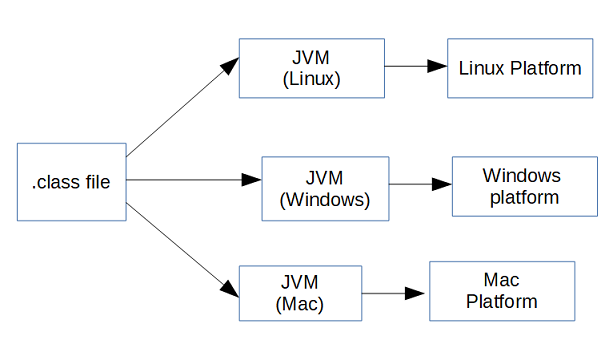
Bytecode interpretation by JVM

JRE

JRE meaning Java Runtime Environment provides the libraries, the Java Virtual Machine, and other components to run applets and applications written in the Java programming language.

The compiled bytecode doesn't run on CPU directly, JVM sits in between and interpret the bytecode into readable machine language for the CPU. It is actually the JRE that enables Java bytecode to run on any platform. Bytecodes, which are interpreted by the JVM, simply call classes found in the JRE when they need to perform actions they cannot do by themselves
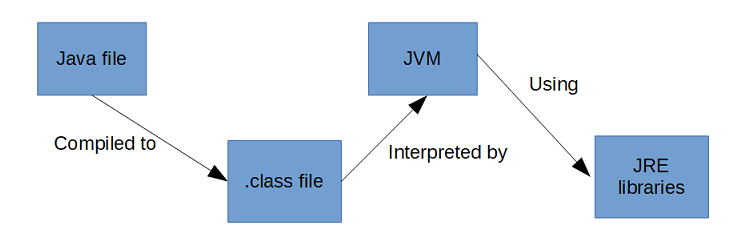
JVM and JRE in Java

JDK

JDK meaning Java Development Kit is a superset of the JRE, and contains everything that is in the JRE, plus development tools such as the compilers and debuggers necessary for developing applets and applications.

That's all for this topic What Are JVM, JRE And JDK in Java. If you have any doubt or any suggestions to make please drop a comment. Thanks!

>>>Return to Java Basics Tutorial Page


Related Topics

  1. Why main Method static in Java
  2. Why Class Name And File Name Should be Same in Java
  3. Java Pass by Value or Pass by Reference
  4. static Keyword in Java With Examples
  5. Core Java Basics Interview Questions And Answers

You may also like-

  1. Class in Java
  2. Object in Java
  3. Encapsulation in Java
  4. Constructor Chaining in Java
  5. Fail-Fast Vs Fail-Safe Iterator in Java
  6. Difference Between Comparable and Comparator in Java
  7. Java Semaphore With Examples
  8. Spring Bean Life Cycle

Friday, February 16, 2024

Difference Between ArrayList And Vector in Java

In many ways Vector class in Java is just like ArrayList apart from some differences and this post is about those differences between the ArrayList and Vector in Java.

There are many similarities between Vector and ArrayList classes in Java. Vector, just like ArrayList, is also a growable dynamic array. As of Java v1.2, this class was retrofitted to implement the List interface, making it a member of the Java Collections Framework.

With JDK 5 it was also retrofitted for generics and implements Iterable interface too which means it can also use enhanced for loop.

ArrayList Vs Vector in Java

  • ArrayList is not synchronized whereas Vector is Synchronized. Which means that the methods in the Vector class are Synchronized making Vector thread-safe and ready to use as-is in a multi-threaded environment.
    ArrayList, if needed in a multi-threaded environment, has to be synchronized externally using Collections.synchronizedList method which returns a synchronized (thread-safe) list backed by the specified list.
  • Refer How and why to synchronize ArrayList in Java to know how to synchronize an ArrayList.

  • A Vector, by default, doubles the size of its array when it needs to expand the array, while the ArrayList increases its array size by 50 percent.
  • As mentioned though Vector is retrofitted to implement the List interface it still has legacy methods which are not there in ArrayList. As Example methods like addElement(), removeElement(), capacity() which are there in Vector class but not in ArrayList.
  • Performance wise Vector is comparatively slower than the ArrayList because it is synchronized. That means only one thread can access method of Vector at the time and there is an overhead of acquiring lock on the object too.
  • For traversing an ArrayList as well as Vector, Iterator or ListIterator can be used. That Iterator/ListIterator is fail-fast and throws ConcurrentModificationException if any other Thread modifies the map structurally by adding or removing any element except Iterator's own remove() method.
    For Vector enumeration can also be used for traversing which is not fail-fast.

That's all for this topic Difference Between ArrayList And Vector in Java. If you have any doubt or any suggestions to make please drop a comment. Thanks!


Related Topics

  1. Difference Between ArrayList And LinkedList in Java
  2. Difference Between Array And ArrayList in Java
  3. Difference Between ArrayList And CopyOnWriteArrayList in Java
  4. How to Remove Elements From an ArrayList in Java
  5. Java Collections Interview Questions And Answers

You may also like-

  1. Fail-Fast Vs Fail-Safe Iterator in Java
  2. How to Sort HashSet in Java
  3. Difference Between Comparable and Comparator in Java
  4. Polymorphism in Java
  5. Array in Java With Examples
  6. finalize method in Java
  7. Nested Try Statements in Java Exception Handling
  8. Spring Boot Event Driven Microservice With Kafka

Thursday, February 15, 2024

Ternary Search Program in Java

In this post we’ll see how to write Ternary search program in Java. Ternary search is a divide and conquer algorithm just like Binary search how it differs is that the array is divided into three parts rather than two which reduces the range of search by 1/3 in each iteration.

How does Ternary search work

One of the prerequisite for the Ternary search is that the input array should be sorted.

In each iteration searched element is compared with two middle elements (mid1 and mid2) calculated for the 1/3rd parts.

If searched element is less than mid1 that means the searched element should be in between the start element and mid1 as the array is sorted.

If searched element is greater than mid1 but less than mid2 that means the searched element should be in between the mid1 and mid2.

If searched element is greater than mid2 that means the searched element is in the last 1/3rd part of the array.

In the next iteration search is done with in that 1/3rd part of the array where the searched element lies.

This process of division and searching continues unless the element is found or the length of the sub-array becomes 0 which means searched element is not found in the array.

Following image shows the process of division in each iteration.

Ternary search in Java

Ternary search Java program

Ternary search program in Java using recursive calls.

public class TernarySearch {
  public static void main(String[] args) {
    Scanner sc = new Scanner(System.in);
    int[] arr = {12, 23, 10, 34, 55, 4, 68, 3, 73};
    Arrays.sort(arr);
    System.out.println("sorted array- " + Arrays.toString(arr));
    System.out.println("Enter value to search: ");
    int searchElement = sc.nextInt();
    int index = ternarySearch(arr, 0, arr.length-1, searchElement);
    if(index != -1){
      System.out.println("Searched item " + arr[index] + " found at index "+index);
    }else{
      System.out.println("Searched item " + searchElement + " not found in the array");
    }
  }
    
  private static int ternarySearch(int[] arr, int start, int end, int searchElement){
    // exit condition
    if(start > end){
      return -1;
    }
    int mid1 = start + (end - start)/3;
    int mid2 = start + 2*(end - start)/3;
    System.out.println("start-" + start + " end- " + end + " mid1- " + mid1 + " mid2- " + mid2);
    if(searchElement == arr[mid1]){
      return mid1;
    }
    if(searchElement == arr[mid2]){
      return mid2;
    }
    // first 1/3
    if(searchElement < arr[mid1]){
      return ternarySearch(arr, start, mid1-1, searchElement);
    }else if (searchElement > arr[mid2]){
      // last 1/3
      return ternarySearch(arr, mid2+1, end, searchElement);
        
    }else{
      // mid 1/3
      return ternarySearch(arr, mid1+1, mid2-1, searchElement);
    }
  }
}

Output for few searches:

sorted array- [3, 4, 10, 12, 23, 34, 55, 68, 73]
Enter value to search: 
68
start-0 end- 8 mid1- 2 mid2- 5
start-6 end- 8 mid1- 6 mid2- 7
Searched item 68 found at index 7

sorted array- [3, 4, 10, 12, 23, 34, 55, 68, 73]
Enter value to search: 
10
start-0 end- 8 mid1- 2 mid2- 5
Searched item 10 found at index 2

sorted array- [3, 4, 10, 12, 23, 34, 55, 68, 73]
Enter value to search: 
90
start-0 end- 8 mid1- 2 mid2- 5
start-6 end- 8 mid1- 6 mid2- 7
start-8 end- 8 mid1- 8 mid2- 8
Searched item 90 not found in the array

Performance of Ternary search

Time complexity of Ternary search is O(log3n) but the comparisons are more in Ternary search.

Space complexity of Ternary search is O(1) as no auxiliary space is needed. Though recursive solution will have method stacks for each recursive call making the space complexity as O(logn).

That's all for this topic Ternary Search Program in Java. If you have any doubt or any suggestions to make please drop a comment. Thanks!

>>>Return to Java Programs Page


Related Topics

  1. Linear Search (Sequential Search) Java Program
  2. Interpolation Search Program in Java
  3. Bucket Sort Program in Java
  4. Array Rotation Java Program
  5. Print Odd-Even Numbers Using Threads And wait-notify Java Program

You may also like-

  1. Zipping Files And Folders in Java
  2. How to Read File From The Last Line in Java
  3. Arrange Non-Negative Integers to Form Largest Number - Java Program
  4. Generating Getters And Setters Using Reflection in Java
  5. Nested Class And Inner Class in Java
  6. ResultSet Interface in Java-JDBC
  7. String Vs StringBuffer Vs StringBuilder in Java
  8. Angular Class Binding With Examples

Wednesday, February 14, 2024

Binary Search Program in Java

In this post we’ll see how to write Binary search program in Java. Binary search is a divide and conquer algorithm which reduces the range of search by half in each iteration, thus making it more efficient than the Linear search.

How does Binary search work

One of the prerequisite for the Binary search is that the input array should be sorted.

In each iteration searched element is compared with the middle element of the array. If searched element is less than the middle element of the array that means the searched element should be in between the start element to middle element of the array as the array is sorted.

In the next iteration search is done with in the sub-array start to middle (0 to (n/2-1)) or with in the sub-array ((n/2+1) to end) if searched element is greater than the middle element.

This process of division and searching continues unless the element is found or the length of the sub-array becomes 0 which means searched element is not found in the array.

Following image shows the process of division in each iteration

binary search in Java

Binary search Java program

Java program for Binary search can be written in both recursive and iterative ways. We’ll see both of these solutions here.

Binary search in Java – Iterative program

public class BinarySearch {
  public static void main(String[] args) {
    Scanner sc = new Scanner(System.in);
    int[] arr = {12, 23, 10, 34, 55, 4, 68, 3, 73, 99};
    Arrays.sort(arr);
    System.out.println("sorted array- " + Arrays.toString(arr));
    System.out.println("Enter value to search: ");
    int searchElement = sc.nextInt();
    int index = binarySearch(arr, 0, arr.length-1, searchElement);
    if(index != -1){
      System.out.println("Searched item " + arr[index] + " found at index "+index);
    }else{
      System.out.println("Searched item " + searchElement + " not found in the array");
    }
  }
    
  private static int binarySearch(int[] arr, int start, int end, int searchElement){
    while(start <= end){
      int middle = (start+end)/2;
      System.out.println("start- " + start + " end " + end + " middle- " + middle);
      // element found
      if(searchElement == arr[middle]){
        return middle;
      }
      // left half
      if(searchElement < arr[middle]){
        end = middle - 1;
      }else{
          // right half
        start = middle + 1;
      }
    }
    return -1;
  }
}

Output

sorted array- [3, 4, 10, 12, 23, 34, 55, 68, 73, 99]
Enter value to search: 
34
start- 0 end 9 middle- 4
start- 5 end 9 middle- 7
start- 5 end 6 middle- 5
Searched item 34 found at index 5

Binary search in Java – Recursive program

public class BinarySearch {
  public static void main(String[] args) {
    Scanner sc = new Scanner(System.in);
    int[] arr = {12, 23, 10, 34, 55, 4, 68, 3, 73, 99};
    Arrays.sort(arr);
    System.out.println("sorted array- " + Arrays.toString(arr));
    System.out.println("Enter value to search: ");
    int searchElement = sc.nextInt();
    int index = binarySearch(arr, 0, arr.length-1, searchElement);
    if(index != -1){
      System.out.println("Searched item " + arr[index] + " found at index "+index);
    }else{
      System.out.println("Searched item " + searchElement + " not found in the array");
    }
  }
    
  private static int binarySearch(int[] arr, int start, int end, int searchElement){
    // exit condition
    if(start > end){
      return -1;
    }    
    int middle = (start+end)/2;
    System.out.println("start- " + start + " end " + end + " middle- " + middle);
    // element found
    if(searchElement == arr[middle]){
      return middle;
    }
    // left half
    if(searchElement < arr[middle]){
      return binarySearch(arr, start, middle-1, searchElement);
    }else{
      // right half
      return binarySearch(arr, middle+1, end, searchElement);        
    }
  }
}

Output

sorted array- [3, 4, 10, 12, 23, 34, 55, 68, 73, 99]
Enter value to search: 
55
start- 0 end 9 middle- 4
start- 5 end 9 middle- 7
start- 5 end 6 middle- 5
start- 6 end 6 middle- 6
Searched item 55 found at index 6

Performance of Binary search

Time complexity of Binary search is O(logn).

Space complexity of Binary search is O(1) as no auxiliary space is needed. Though recursive solution will have method stacks for each recursive call making the space complexity as O(logn).

That's all for this topic Binary Search Program in Java. If you have any doubt or any suggestions to make please drop a comment. Thanks!

>>>Return to Java Programs Page


Related Topics

  1. Interpolation Search Program in Java
  2. Radix Sort Program in Java
  3. Selection Sort Program in Java
  4. Running Dos/Windows Commands From Java Program
  5. Find Maximum And Minimum Numbers in a Given Matrix Java Program

You may also like-

  1. Reading File in Java Using Scanner
  2. Java Lambda Expression Callable Example
  3. Checking Number Prime or Not Java Program
  4. Spring MVC Exception Handling Example Using @ExceptionHandler And @ControllerAdvice
  5. Encapsulation in Java
  6. Constructor Chaining in Java
  7. Reduction Operations in Java Stream API
  8. Batch Processing in Java JDBC - Insert, Update Queries as a Batch

Tuesday, February 13, 2024

Linear Search (Sequential Search) Java Program

In this post we’ll see how to write Linear search or Sequential search program in Java. Linear search is considered the simplest searching algorithm but it is the slowest too because of the large number of comparisons.

How Linear search works

Linear search as the name suggests works by linearly searching the input array for the searched element.

  1. Compare the searched element with each element of the array one by one starting from the first element of the array.
  2. If the searched element is found return the index of the array where it is found. If searched element is not found with in the searched array then return -1.
linear search in Java

Linear search Java program

Java program for linear search can be written in both recursive and iterative ways. We’ll see both of these solutions here.

Linear search in Java – Iterative program

In the Java program for linear search, user is prompted to enter the searched element. Then the array is traversed in a loop to find the element. If element is found in the array its index is returned otherwise -1 is returned.

public class LinearSearch {
  public static void main(String[] args) {
    Scanner sc = new Scanner(System.in);
    int[] arr = {12, 23, 10, 34, 55, 4, 68, 3, 73, 99};
    System.out.println("Enter value to search: ");
    int searchElement = sc.nextInt();
    int index = linearSearch(arr, searchElement);
    if(index != -1){
        System.out.println("Searched item " + arr[index] + " found at index "+index);
    }else{
        System.out.println("Searched item " + searchElement + " not found in the array");
    }
  }
    
  private static int linearSearch(int[] arr, int searchElement){
    for(int i = 0; i < arr.length; i++){
      if(arr[i] == searchElement){
        return i;
      }
    }
    return -1;
  }
}
Output for few searches-
Enter value to search: 
68
Searched item 68 found at index 6

Enter value to search: 
8
Searched item 8 not found in the array

Enter value to search: 
10
Searched item 10 found at index 2

Linear search in Java – Recursive program

In the recursive linear search program, search method is called recursively with the next index. Exit condition is when index is greater than the last index of the array.

public class LinearSearch {
  public static void main(String[] args) {
    Scanner sc = new Scanner(System.in);
    int[] arr = {12, 23, 10, 34, 55, 4, 68, 3, 73, 99, 15};
    System.out.println("Enter value to search: ");
    int searchElement = sc.nextInt();
    int index = linearSearch(arr, 0, arr.length - 1, searchElement);
    if(index != -1){
      System.out.println("Searched item " + arr[index] + " found at index "+index);
    }else{
      System.out.println("Searched item " + searchElement + " not found in the array");
    }
  }
    
  private static int linearSearch(int[] arr, int index, int length, int searchElement){
    // exit condition
    if(index > length)
      return -1;
    // when searched element is found
    if(arr[index] == searchElement){
      return index;
    }
    return linearSearch(arr, index+1, length, searchElement);
  }
} 
Output for few searches-
Enter value to search: 
12
Searched item 12 found at index 0

Enter value to search: 
15
Searched item 15 found at index 10

Enter value to search: 
34
Searched item 34 found at index 3

Enter value to search: 
18
Searched item 18 not found in the array

Time and Space complexity of Linear search

Since comparison of elements is done linearly so average and worst time complexity of Linear search is O(n). Space complexity of linear search is O(1) for iterative solution as no extra space is needed. For recursive solution recursive method calls are stacked so in that case space complexity is O(n).

That's all for this topic Linear Search (Sequential Search) Java Program. If you have any doubt or any suggestions to make please drop a comment. Thanks!

>>>Return to Java Programs Page


Related Topics

  1. Binary Search Program in Java
  2. Bubble Sort Program in Java
  3. Tree Sort in Java Using Binary Search Tree
  4. Factorial Program in Java
  5. Find Duplicate Characters in a String With Repetition Count Java Program

You may also like-

  1. Array Rotation Java Program
  2. How to Convert Date And Time Between Different Time-Zones in Java
  3. Write to a File in Java
  4. Producer-Consumer Java Program Using volatile
  5. Difference Between ArrayList And LinkedList in Java
  6. Optional Class in Java With Examples
  7. Generic Class, Interface And Generic Method in Java
  8. String join() Method And StringJoiner Class in Java

Monday, February 12, 2024

Interpolation Search Program in Java

In this post we’ll see how to write Interpolation search program in Java. Interpolation search is a variation of Binary search, meaning it is also a divide and conquer algorithm how it differs is that rather than dividing the input array into two equal parts it tries to divide the array in such a way that the position is nearer to the searched element.

How does Interpolation search work

One of the prerequisite for the Interpolation search is that the input array should be sorted and the values are uniformly distributed.

Interpolation search takes into account the lowest and highest elements in the array as well as length of the array and tries to estimate the position of the searched element. It works on the principle that the searched element is likely to be located near the end of the array if the searched element is close to the highest element in the array and it is likely to be located near the start of the array if the searched element is close to the lowest element in the array.

Interpolation search uses the following formula to calculate the position to be compared with the searched element.

position = start + ((searchElement - arr[start]) * (end - start) / (arr[end] – arr[start]))

In each iteration searched element is compared with the element at the calculated position and start and end are adjusted based upon whether the searched element is greater than or less than the calculated position.

Interpolation search Java Program

public class InterpolationSearch {
  public static void main(String[] args) {
    Scanner sc = new Scanner(System.in);
    int[] arr = {12, 23, 10, 34, 55, 4, 68, 3, 73};
    Arrays.sort(arr);
    System.out.println("sorted array- " + Arrays.toString(arr));
    System.out.println("Enter value to search: ");
    int searchElement = sc.nextInt();
    int index = interpolationSearch(arr, searchElement);
    if(index != -1){
      System.out.println("Searched item " + arr[index] + " found at index "+index);
    }else{
      System.out.println("Searched item " + searchElement + " not found in the array");
    }
    sc.close();
  }
  private static int interpolationSearch(int[] arr, int searchElement){
    int start = 0;
    int end = arr.length - 1;
    int position;
    while ((arr[end] != arr[start]) && (searchElement >= arr[start]) && (searchElement <= arr[end])) {
      position = start + ((searchElement - arr[start]) * (end - start) / (arr[end] - arr[start]));

      // Nearer to the highest element
      if (arr[position] < searchElement)
        start = position + 1;
      // Nearer to the lowest element
      else if (searchElement < arr[position])
        end = position - 1;
      else
        return position;
    }
    if (searchElement == arr[start])
      return start ;
    else
      return -1;
  }
}

Output for few of the searches-

sorted array- [3, 4, 10, 12, 23, 34, 55, 68, 73]
Enter value to search: 
55
Searched item 55 found at index 6

sorted array- [3, 4, 10, 12, 23, 34, 55, 68, 73]
Enter value to search: 
23
Searched item 23 found at index 4

Interpolation search Performance

Average case time complexity of Interpolation search is O(log(log(n))) if the elements are uniformly distributed. In worst case time complexity can be O(n).

Space complexity of Interpolation search is O(1) as no auxiliary space is required.

That's all for this topic Interpolation Search Program in Java. If you have any doubt or any suggestions to make please drop a comment. Thanks!

>>>Return to Java Programs Page


Related Topics

  1. Exponential Search Program in Java
  2. Ternary Search Program in Java
  3. Shell Sort Program in Java
  4. Find Maximum And Minimum Numbers in a Given Matrix Java Program
  5. Printing Numbers in Sequence Using Threads Java Program

You may also like-

  1. Getting All The Tables in a Schema in a DB - Java Program
  2. Armstrong Number or Not Java Program
  3. Compress And Decompress File Using GZIP Format in Java
  4. How to Create PDF From XML Using Apache FOP
  5. super Keyword in Java With Examples
  6. How ArrayList Works Internally in Java
  7. Java Phaser With Examples
  8. How to Inject Prototype Scoped Bean into a Singleton Bean in Spring

Sunday, February 11, 2024

Exponential Search Program in Java

In this post we’ll see how to write Exponential search program in Java. Exponential search is a variation of Binary search, meaning it is also a divide and conquer algorithm how it differs is that rather than dividing the input array into two equal parts in Exponential search a range with in the input array is determined with in which the searched element would reside. Then using Binary search element is searched with in that range.

Exponential search is used to search elements in unbounded arrays.

How does Exponential search work

One of the prerequisite for the Exponential search is that the input array should be sorted.

Exponential search works in two stages. In the first stage a range is calculated that contains the searched element. In the second stage Binary search is done with in that range to search the element.

Exponential search starts by finding the first element that satisfies both of these conditions-

  1. Greater than the searched element
  2. Has index as a power of 2.

This index becomes the upper bound for the range, if such index is j then 2j-1 (or j/2) is the lower bound for the search.

Exponential search Java Program

public class ExponentialSearch {
  public static void main(String[] args) {
    Scanner sc = new Scanner(System.in);
    int[] arr = {5, 65, 89, 3, 1, 10, 11, 22, 34, 43};
    Arrays.sort(arr);
    System.out.println("Sorted array- " + Arrays.toString(arr));
    System.out.println("Enter value to search: ");
    int searchElement = sc.nextInt();
    int index = exponentialSearch(arr, searchElement);
    if(index != -1){
      System.out.println("Searched item " + arr[index] + " found at index "+index);
    }else{
      System.out.println("Searched item " + searchElement + " not found in the array");
    }
    sc.close();
  }
    
  private static int exponentialSearch(int[] arr, int searchElement){
    int bound = 1;
    // increase upper bound 
    while (bound < arr.length && arr[bound] < searchElement) {
      bound *= 2;
    }
    // do binary search with in the range
    return binarySearch(arr, bound/2, Integer.min(bound + 1, arr.length), searchElement);
  }

  private static int binarySearch(int[] arr, int start, int end, int searchElement){
    // exit condition
    if(start > end){
      return -1;
    }        
    int middle = (start+end)/2;
    // element found
    if(searchElement == arr[middle]){
      return middle;
    }
    // left half
    if(searchElement < arr[middle]){
      return binarySearch(arr, start, middle-1, searchElement);
    }else{
      // right half
      return binarySearch(arr, middle+1, end, searchElement);        
    }
  }
}

Output

sorted array- [1, 3, 5, 10, 11, 22, 34, 43, 65, 89]
Enter value to search: 
10
Searched item 10 found at index 3

Exponential search Performance

The first stage of the algorithm where the range is determined takes O(log i) time, where i is the index of the searched element in the input array.

Second stage where Binary search is done also takes O(log i) for the given range. So the total time taken is 2*O(log i). Thus the time complexity of Exponential search is O(log i).

Space complexity of Exponential search is O(1), for recursive implementation of Binary search method calls are stacked for each recursive call making the space complexity as O(log i) in that case.

That's all for this topic Exponential Search Program in Java. If you have any doubt or any suggestions to make please drop a comment. Thanks!

>>>Return to Java Programs Page


Related Topics

  1. Interpolation Search Program in Java
  2. Linear Search (Sequential Search) Java Program
  3. Merge Sort Program in Java
  4. Find Maximum And Minimum Numbers in a Given Matrix Java Program
  5. Printing Numbers in Sequence Using Threads Java Program

You may also like-

  1. Reading File in Java Using Scanner
  2. Creating PDF in Java Using iText
  3. Converting double to String in Java
  4. How to Convert Date And Time Between Different Time-Zones in Java
  5. this Keyword in Java With Examples
  6. How HashMap Works Internally in Java
  7. Java Semaphore With Examples
  8. Spring MVC File Download Example